You decide who can access computers, machines and areas connected to ChipLogin. Block lost cards and look up access events in the records. Communication is encrypted, and access data stays on your network.
With shared management, block the card in ChipLogin Server and assign a replacement. On standalone computers, revoke access on each relevant device. For disconnected devices, changes depend on how permissions are updated.
Update permissions through shared management. When an employee changes role, adjust their access to the connected computers, machines and doors.
Find out whose card was used, when, at which device and with what result. Review granted and denied access together.
With shared management, ChipLogin Server stores access data and records on your network. Details of record integrity verification are available below in the audit trail section.
Devices verify each other using certificates. The following overview is intended for your IT team.
Every station, reader, and control unit has its own X.509 certificate and authenticates the server just as the server authenticates it. The mTLS connection rejects devices that cannot present a trusted certificate.
Each device generates its private key locally and is designed to keep it on that device, so copying application files alone does not reproduce the station's mTLS identity.
When a new station registers, the administrator confirms its identity by eye using a visual fingerprint (drunken-bishop randomart) — the same principle OpenSSH uses to verify a host key.
ChipLogin supports MIFARE DESFire cards. We will assess whether your existing DESFire cards can be used.
We support MIFARE DESFire with cryptographic verification. A readable card number alone is not enough. Before using existing cards, we check their configuration and suitable readers.
A UID alone does not grant access. The card must pass cryptographic verification and be assigned to a user with the relevant permission. A copy of the card number cannot replace that proof.
DESFire lets the system verify that a card holds the correct secret key, rather than just reading its number. Cryptographic verification is part of the solution, not an optional extra for doors alone.
It isn't one "encryption" — it's three independent locks stacked on top of each other. Breaking one doesn't open the other two.
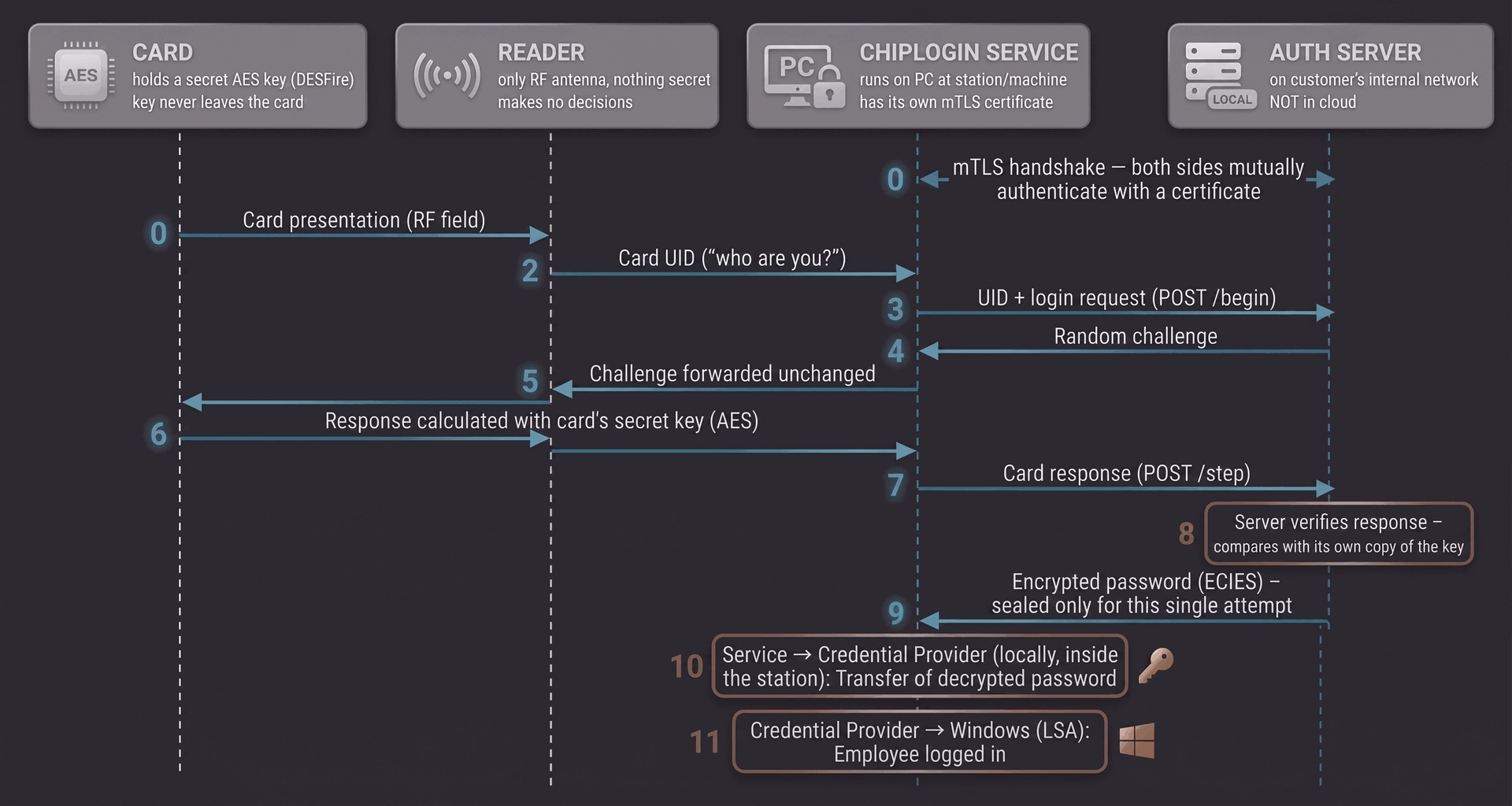
Before a station and server exchange application data, both sides verify each other with their own certificate. A device without the corresponding trusted certificate and private key cannot complete that mTLS authentication.
The card never reveals its secret key, only proves it knows it. The server sends a random challenge, the card computes it with its key, the server verifies the result. An intercepted response is useless the second time — the next challenge will be different.
Once the card proves its identity, the server encrypts the Windows password exclusively for a one-time key the station generated just for this attempt. Only it can decrypt it — and only right now. A plaintext password never travels over the network.
Concrete scenarios, not vague promises.
The server recognizes the card can't answer the cryptographic challenge because it doesn't know the secret key — rejected immediately as an unknown card, before any sensitive data is exchanged.
Passive network capture exposes mTLS-encrypted traffic rather than plaintext. The password payload is additionally sealed to the station's one-time key for that login attempt, which also limits replay of a captured payload.
There's no stored password to find. Passwords live on the server — on the station, they exist in memory for only a fraction of a second during login itself.
The administrator blocks the station on the server just like a card — from that moment, the server rejects any request bearing its certificate, even if the attacker powers the computer on.
The station rejects it at the mTLS level already — it doesn't have a valid certificate the station recognizes as the real server.
The administrator blocks or revokes the card in the system — a pure database operation, with nothing to change on the stations.
Every login, machine authorization, and door event becomes one signed record.
Every event — a login, a machine authorization, a door unlock or denial — gets written to the log and signed the moment it happens.
Windows logins, machine authorizations, and door events all land in the same log, with the same structure — no merging export formats from three different vendors before an audit.
The log itself lives on your ChipLogin Server, on your network — no copy of your access data sitting in a third-party cloud.
Every record carries the hash of the one before it, so later alteration breaks the verifiable chain. Its fingerprint is also periodically anchored with an independent witness (ChipLogin Cloud), which receives a one-way fingerprint rather than the record content. Together these mechanisms are designed to make retrospective changes detectable.
The mTLS device architecture, visual verification, and audit logging described above run across the entire ChipLogin platform — ChipLogin for Windows, ChipLogin for Machines, and ChipLogin for Doors all share the same identity layer and the same server.
Have a specific security question — key rotation, certificate lifecycle, deployment topology? Request a technical consultation below.
Tell us what you need to verify. You do not need technical specifications to start. We will work through the details with you and your IT team.
or use the form below ↓
We will get in touch to discuss the next steps.